
NEWS-TRADERNFPNATURAL-GASTUTORIAL7 min read
What is Macroeconomic News Trading?
Macroeconomic news trading is all about taking a position on a key economic indicator as it prints. Here is the MacroPulse Macroeconomic News Trading 101 class.
Macroeconomic news trading is all about taking a position on a key economic indicator as it prints. Here is the MacroPulse Macroeconomic News Trading 101 class.
By the time you see the data release on your news feed, the move is over.
BLS and EIA sites crawl under release-time traffic. By the time the page loads and you've found the number in the table, seconds are gone.
News aggregators and resellers add latency hops between you and the source — delays of 2–3 seconds are common.
You see the number, switch to your broker, size the position, click execute. By then the move is already priced in.
Set your rules. We handle the rest.
Pick from 50+ high-impact indicators — CPI, Core PCE, GDP, NFP, jobless claims, EIA crude, WASDE, Australian CPI and more.
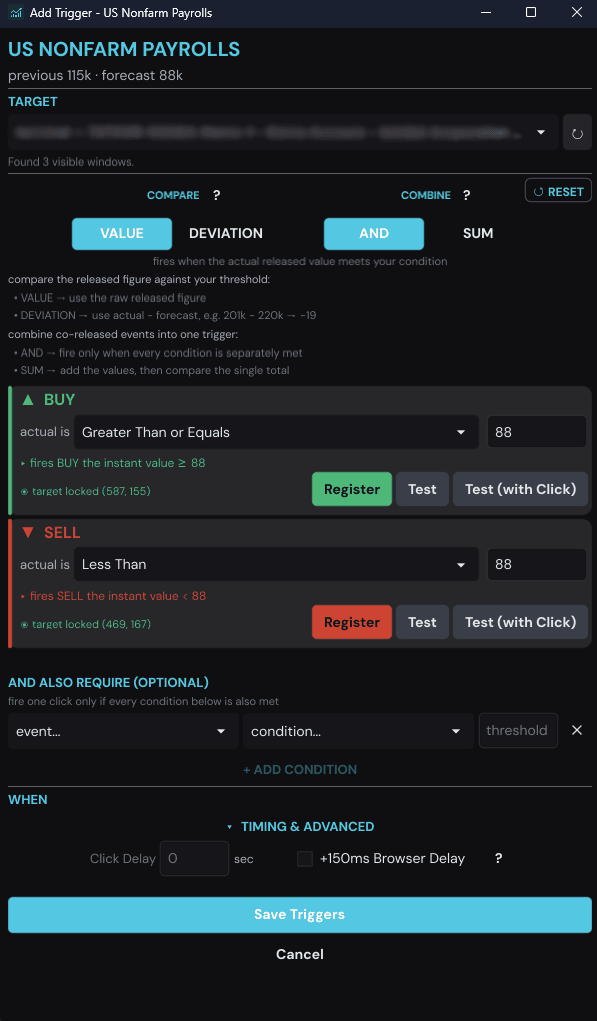
See when each one dropsselect()Define your rule, e.g. "buy if CPI beats forecast by 0.2". Direction, size and thresholds are yours — nothing fires unless your condition is met.
setup()The desktop app pre-positions on your broker before the drop, then executes the moment your condition hits — on any platform.
execute()The MacroPulse desktop app: the numbers come in live, your triggers sit armed, and the trade goes out on your broker — automatically.
Trade the next release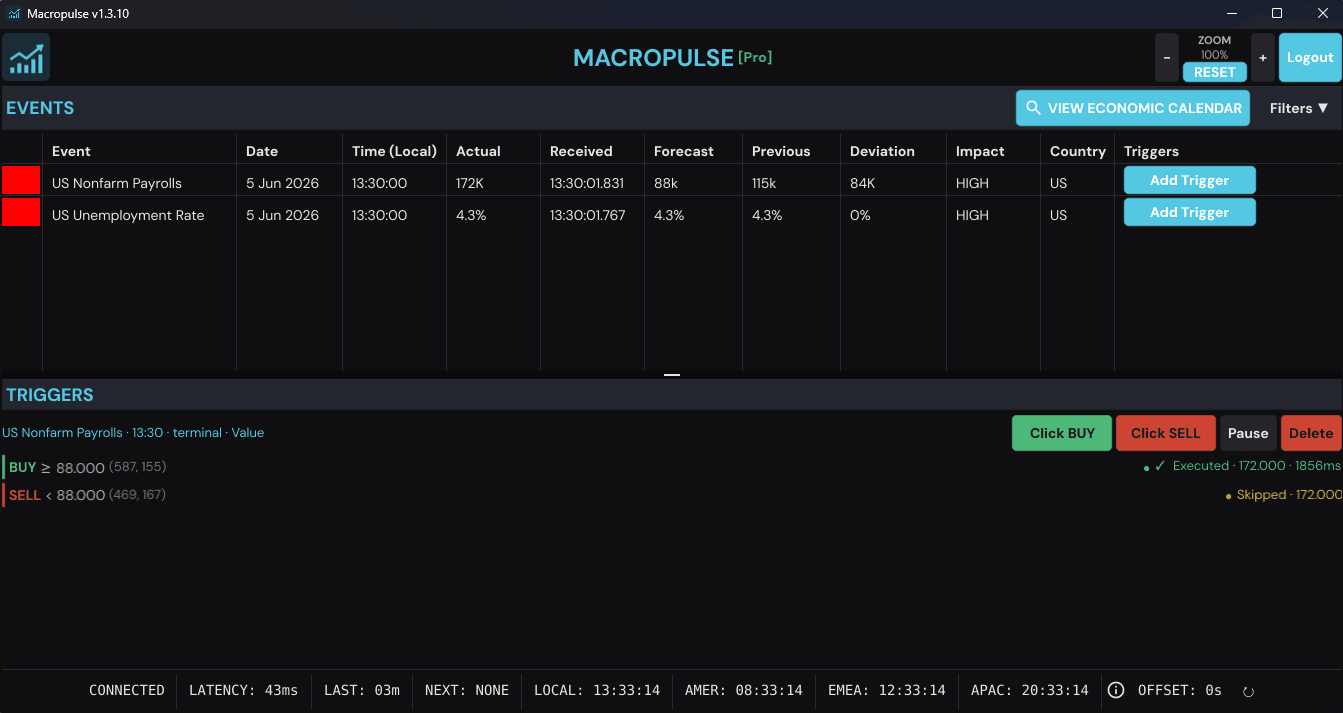
US Non-Farm Payrolls day — actual 172K received at 13:30:01.831, BUY ≥ 88 executed automatically.
Every component engineered to eliminate latency between data releases and trade execution.
Scraped straight from the BLS, BEA, EIA, DOL, USDA, UMich and ABS — no middlemen, no resold feeds.
Releases parsed and delivered to your desktop before anyone else has loaded the page.
The app pre-activates your broker window and positions your mouse before the release. When the number lands, the click is ~16ms behind it.
The desktop client fires your trades on any platform. No coding needed.
Works as an overlay on MetaTrader, TradingView, NinjaTrader, cTrader or any web broker.
Inflation (CPI, PPI, PCE), growth (GDP), employment (NFP, jobless claims, JOLTS), energy (EIA), agriculture (WASDE), plus consumer sentiment, import/export prices and Australia's CPI, jobs, GDP and trade.
~16ms
From data receipt to executed trade
50+
Indicators covered across the calendar
7
Sources scraped directly — no middlemen
MacroPulse Basic
Weekly EIA and DOL releases for energy and labour-market traders — great for testing and smaller accounts.
$199
$149
/mo
Cancel anytime. 7-day money-back guarantee.
MacroPulse Pro
The complete pipeline — all 50+ US and Australian indicators, including CPI, NFP, PPI, WASDE and GDP.
$349
$249
/mo
Cancel anytime. 7-day money-back guarantee.
We scrape BLS, BEA, EIA, DOL, USDA, the University of Michigan and the Australian Bureau of Statistics directly. That covers inflation (CPI, PPI, PCE), growth (GDP), employment (NFP, jobless claims, JOLTS), EIA energy inventories, WASDE grain stocks, consumer sentiment and Australia's CPI, jobs, trade and GDP releases.
See every release time on the economic calendarWhen high-impact data like CPI or NFP drops, the first traders to react capture the price spike. Until now, getting that speed required institutional-grade feeds like Bloomberg or Reuters. These feeds are expensive and complex to set up. MacroPulse fills the gap by offering a direct data feed with a desktop client that can auto-execute trades for you milliseconds after the official release.
Our scrapers run colocated in US East, close to the source servers, and race multiple data paths per release. Parsed data typically reaches your desktop well under a second from official publication, and the client's pre-positioning system fires your trade ~16ms after the data arrives.
Pick the release in the desktop app, set your rule (e.g. sell if CPI YoY prints 0.2 above forecast), choose direction and size, and arm the trigger. When the BLS publishes, MacroPulse scrapes the number at the source, streams it to your app over WebSocket and fires your pre-positioned trade — all within milliseconds of the official release.
See how real NFP releases moved the marketNo. The desktop client handles everything. Set your conditions (e.g. "buy if CPI beats forecast by 0.2") and the client auto-executes trades on any platform — MT4, MT5, IG, Interactive Brokers, TradingView, NinjaTrader and more.
It's the controllable version of one. A typical news trading bot is a black box — MacroPulse only ever executes rules you define: the event, the direction, the position size and the deviation from forecast that must be hit. If the release doesn't match your rule, nothing fires.
Full control. You define the event, direction, position size and the exact deviation from forecast that triggers a trade — if the release doesn't match your rule, the app does nothing. Triggers can be switched off at any time before the release.
The desktop client works as an overlay compatible with any broker: MetaTrader, TradingView, NinjaTrader, cTrader or any web broker. No API integration needed.
Yes. The desktop client is cross-platform and runs natively on both Windows and macOS.
Yes. MacroPulse reads publicly available release pages the instant data goes live — the same pages anyone can refresh. There is no early or embargoed access; the edge is engineering, not privilege.
Any market where a trade can be entered with a mouse click: futures, forex, CFDs, indices, commodities and stocks — every market your broker offers.
Basic gives you events that are released on a weekly basis, which is great for testing and learning how to trade and use the software. Pro gives you access to all events, including those released on a monthly basis, which are typically the most impactful and affect many markets.
Yes, until your first live release. If you subscribe without the free month, you can get a full refund of the first charge within 7 days, as long as no scheduled release has been delivered to your account yet. The product is the release, so once one has landed the charge is final. If you started with the free month, that was your trial and paid charges are final. Contact support to claim.
Institutional feeds like AlphaFlash and haawks require enterprise onboarding, have opaque pricing, and rely on data centre colocation for low-latency delivery — built for quant desks, not individual traders. They also deliver data only; you still need to build your own execution. MacroPulse is self-service with transparent pricing and includes a desktop app that auto-executes trades for you.
Get the data feed and the auto-execution client in one subscription. 7-day money-back guarantee, cancel anytime.
Start trading faster